Mastering Floral Art with Lily Brushes Procreate Stamps
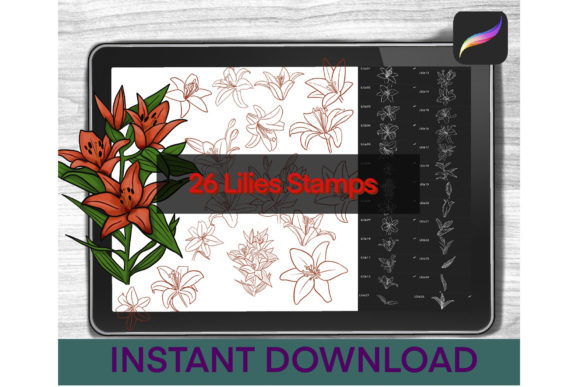
Digital illustration offers unparalleled freedom, yet one of the most time-consuming aspects of creating botanical art is rendering complex flowers like lilies from scratch. Whether you are a professional graphic designer, a hobbyist journaler, or a social media content creator, the pressure to produce high-quality, realistic imagery quickly can be overwhelming. This is where Lily Brushes Procreate Stamps become an indispensable asset in your digital toolkit. By integrating a specialized set of 26 stamps featuring flowers, buds, and lily leaves directly into your workflow, you can bypass the tedious sketching phase and focus on composition, color theory, and storytelling.
The primary challenge many iPad artists face is maintaining consistency while managing tight deadlines. Drawing a realistic lily requires a deep understanding of petal structure, vein placement, and light interaction. Without years of practice, achieving a natural look can be frustrating. Furthermore, when working on projects like wedding invitations, planner stickers, or pattern designs, you often need multiple variations of the same element. Manually drawing every single bloom leads to burnout and inconsistent results. The goal for most users is not just to draw a flower, but to create a cohesive aesthetic that feels organic and professional without sacrificing hours of productivity.
Lily Brushes Procreate Stamps address these pain points by providing a ready-to-use library of high-fidelity botanical elements. This set is specifically designed to solve the problem of repetitive strain and creative block. Instead of staring at a blank canvas wondering how to start a petal, you have immediate access to pre-rendered, realistic lilies in various stages of growth. The set includes fully bloomed flowers, tight buds, and detailed leaves, allowing you to mix and match components to create unique arrangements. This approach shifts your role from a laborious renderer to a strategic composer, enabling you to build complex scenes in minutes rather than days.
Practical Applications and Creative Outcomes
The versatility of this brush set extends far beyond simple decoration. For stationery designers, these stamps are perfect for creating custom digital planners or printable wall art. You can layer the provided buds and leaves to construct sprawling floral borders that frame text beautifully. Because the stamps are optimized for the Procreate environment, they respond naturally to pressure sensitivity when used with an Apple Pencil or stylus, allowing you to adjust opacity and size dynamically. This means your final output retains a hand-painted feel rather than looking like a copy-pasted clipart image.
Social media managers and bloggers also benefit significantly from these tools. In an era where visual content must be produced daily, having a reliable source of beautiful imagery is crucial. You can quickly assemble a spring-themed post, a Mother's Day graphic, or a wellness journal cover using the lily elements. The realistic texture of the leaves and petals ensures that your graphics stand out against flat, vector-style competitors. Additionally, because the set includes 26 distinct stamps, you avoid the repetition that often plagues designs made with smaller brush sets. You can create a seamless pattern by rotating and scaling different buds and flowers, resulting in a rich, tapestry-like background.
Consider the scenario of a wedding invitation designer. Clients often request specific floral motifs, and lilies are a popular choice for their elegance and symbolism. Using Lily Brushes Procreate Stamps, you can present clients with multiple layout options during the initial consultation without having to draw each one from scratch. This agility improves client satisfaction and streamlines your revision process. If a client wants more greenery, you simply add the included leaf stamps; if they prefer a minimalist look, you utilize the single bud stamps. The ability to iterate quickly is a massive competitive advantage in the freelance market.
Tailoring the Workflow to Your Needs
Different users will approach these digital tools based on their specific skill levels and project goals. Beginners often use stamp brushes as a learning aid. By studying the shape and shading of the pre-made lilies, novice artists can understand how light hits a curved petal or how veins traverse a leaf. They can trace over the stamps or use them as an underlayer to practice their own rendering techniques. This educational aspect transforms the brush set from a mere shortcut into a teaching tool that accelerates artistic development.
Conversely, advanced professionals utilize these stamps for efficiency and texture enhancement. An experienced illustrator might use the lily stamps as a base and then paint over them with custom textures to add unique details that match their personal style. They may combine the digital stamps with traditional media scans to create a hybrid artwork that feels both modern and classic. The key is recognizing that these tools are flexible; they do not dictate your style but rather support it. Whether you aim for hyper-realism or a whimsical, watercolor aesthetic, the underlying structure provided by the stamps serves as a robust foundation.
Seamless Integration into Your Digital Studio
Implementing these tools into your existing workflow is straightforward, provided you have the necessary requirements: an iPad, an Apple Pencil or compatible stylus, and the Procreate app. The value of the Lily Brushes Procreate Stamps lies not just in the art itself, but in how easily it integrates into your device. Once installed, these brushes behave like native tools, appearing in your brush library ready for immediate use. There is no lag, no compatibility issues, and no need for complex configuration. This ease of use ensures that your creative flow remains uninterrupted.
To get started, you must first acquire the files. After purchasing, you will receive zipped files that need to be unzipped to access the brush data. The installation process is user-friendly but requires a few specific steps to ensure the brushes import correctly. First, download the files to your iPad. Next, open your preferred unzipping app (such as the native Files app) and press the plus sign to choose "Import Files." Navigate to the "Browse" section and select "Downloads." Locate the file you just downloaded and tap it. Click on the zipped file once more and select "Unzip." Finally, tap "Open in" and choose Procreate from the list of applications. The app will automatically import the set, and you will find your new lily tools ready to use.
User Experiences and Final Thoughts
Users who have adopted this set frequently highlight the time saved and the quality of the final output as the most significant benefits. Reviews often mention how the realistic texture of the lily leaves adds a level of depth that is hard to achieve manually without extensive blending skills. Many artists appreciate the variety within the set of 26 stamps, noting that having both open flowers and closed buds allows for dynamic compositions that tell a story of growth and seasonality. The consensus is that these brushes elevate the overall polish of digital artworks, making them suitable for commercial printing and high-resolution displays.
In conclusion, Lily Brushes Procreate Stamps offer a practical solution for anyone looking to enhance their digital floral art. By addressing common challenges such as time constraints, consistency, and technical difficulty, this toolset empowers artists to focus on creativity rather than mechanics. Whether you are designing a brand identity, creating personal art, or learning the ropes of digital painting, these lilies provide the realism and flexibility needed to succeed. With simple installation and immediate applicability, they represent a smart investment in your artistic infrastructure, helping you turn ideas into beautiful realities with just a few taps of your stylus.