Capture Winter Magic with Icicle Xmas Brushes
There is a specific kind of silence that falls over a design project when you finally find the right texture to convey cold. It is not just about lowering the saturation or sliding a blue filter over your work; it is about adding physical weight, refraction, and the jagged beauty of frozen water. This is where the Icicle Xmas Illustrator Pattern Brushes become an indispensable tool in your creative arsenal. Unlike standard vector shapes that can feel flat and repetitive, these brushes offer a dynamic way to frame invitations, border packaging, or accent digital headers with genuine winter atmosphere.
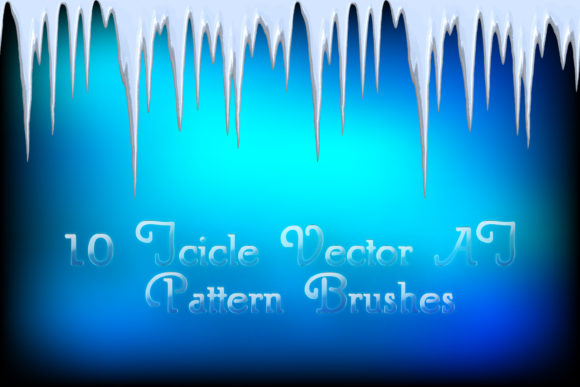
When you load these assets into Adobe Illustrator, you are not just getting a line tool; you are accessing a collection of ten distinct pattern brushes designed to mimic the chaotic elegance of nature. The visual personality here is one of crisp realism. We are talking about glacial whites, deep arctic blues, and subtle grays that suggest shadow and depth without requiring you to manually paint every highlight. The brilliance comes from the built-in volume; each icicle hangs with a sense of gravity, casting realistic shadows that ground the element in your composition. Whether you need a delicate frosty frieze for a wedding invitation or a heavy, thick edging for a holiday sale banner, the flexibility is immediate.
Transforming Flat Designs with Frozen Texture
The primary struggle in seasonal design is avoiding the cliché while still communicating the theme instantly. Many designers fall back on generic snowflakes or solid blue circles, which rarely evoke the actual feeling of winter. The Frosty winter icicle Vector Adobe Illustrator brushes solve this by introducing organic irregularity. Because they are pattern brushes, they stretch and flow along any path you draw. You can create an endless frozen ice ribbon that wraps around a product mockup or creates a unique border for a social media graphic.
What makes these particular assets stand out is their adaptability. In the real world of client work, requirements change constantly. One moment you need a subtle, thin line of frost for a minimalist logo lockup, and the next, you need a bold, thick accumulation of ice for a poster headline. With these brushes, changing the color, size, or thickness is instantaneous within the stroke panel. You aren't locked into a single raster image; you are working with scalable vectors that maintain their sharpness whether printed on a business card or blown up for a billboard. The inclusion of original AI Illustrator 10 and EPS 10 files means that even if you are running older software like CS5, you can still access these high-quality elements, ensuring compatibility across diverse studio environments.
Consider the impact on brand perception. A skincare brand launching a "winter hydration" campaign needs visuals that feel cool and refreshing, not harsh or icy. By adjusting the opacity and selecting the softer gray-blue variants from this set, you can soften the edge while maintaining the temperature of the design. Conversely, a tech company promoting a "freeze-frame" sale might utilize the sharper, high-contrast white icicles to create urgency and visual pop. The ability to tweak these variables allows you to align the design assets perfectly with the emotional tone of the project, moving beyond simple decoration into strategic visual communication.
Practical Applications Across Media and Print
The versatility of these brushes extends far beyond holiday greeting cards. While the name suggests Christmas, the aesthetic is universally winter, making it applicable for New Year's promotions, winter sports branding, or even fantasy book covers. In editorial design, these pattern brushes can serve as sophisticated section dividers. Imagine a travel magazine feature on Arctic expeditions; running a custom-drawn path of these icicles between columns adds a thematic touch that standard rules cannot achieve. It guides the reader's eye while reinforcing the subject matter.
For packaging design, the tactile quality of these vectors is crucial. When applied to a box or label, the illusion of depth created by the internal shadows gives the impression of embossing or specialized printing techniques, all achieved digitally before the file ever hits the press. This can significantly reduce production costs while maintaining a premium look. Similarly, in web design and social media graphics, these elements break up the monotony of flat UI trends. A header image framed by a delicate frost border can increase click-through rates by making the content feel curated and seasonal without overwhelming the user interface.
It is also worth noting the efficiency gain for small business owners and entrepreneurs who manage their own marketing. The included PDF help file with screenshots demystifies the process, allowing non-designers to apply professional-grade textures to their DIY projects. Instead of struggling to create ice effects from scratch using gradient meshes—a time-consuming and technically demanding task—you can apply a brush stroke and have a polished result in seconds. This efficiency allows you to focus on the message and the offer rather than getting bogged down in technical execution.
Maximizing Value and Technical Workflow
Integrating new tools into your workflow requires a bit of exploration to truly unlock their potential. When you first install the Icicle Xmas Illustrator Pattern Brushes, take the time to test them against different background colors. While they shine on dark backgrounds due to the white and light blue tones, they can also be recolored to work on lighter surfaces by adjusting the blending modes or adding a subtle drop shadow in the appearance panel. The set includes ten variations, ranging from dense clusters to sparse, singular drips. Understanding which brush fits which context is key to maintaining visual hierarchy.
From a technical standpoint, the file size of 33.6 MB indicates a high level of detail within the vectors. This richness ensures that when you scale the brushes, they do not lose their definition. However, it also means you should be mindful of file optimization if you are using them extensively in web-based SVGs. For print workflows, the vector nature ensures crisp edges at any resolution. The compatibility with both modern and legacy versions of Illustrator (CS5 and up) ensures that these assets remain useful regardless of your current software subscription status.
Ultimately, the value of these brushes lies in their ability to elevate the perceived quality of your work. They add a layer of professionalism that signals to your audience that care was taken in the details. Whether you are crafting a brand identity for a winter resort or designing a limited-edition holiday label for a craft brewery, these tools provide the necessary visual vocabulary. They allow you to move away from generic clip art and toward custom, bespoke illustrations that feel hand-crafted. If you find that these brushes save you hours of manual drawing and improve the final output of your projects, leaving a rating helps other creatives discover tools that genuinely enhance their workflow. In a field driven by visual impact, having reliable, high-quality textures like these can make the difference between a design that is ignored and one that is remembered.