Elevating Digital Lettering Workflows with Textured Calligraphy Brushes 1.0
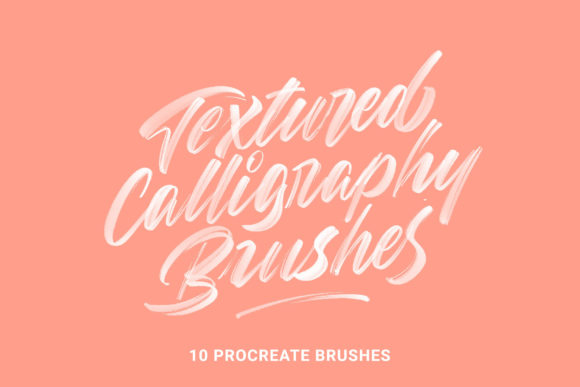
In the rapidly evolving landscape of digital design, the gap between traditional media and tablet-based creation continues to narrow. For professionals ranging from freelance letterers to marketing agencies, the authenticity of a hand-drawn aesthetic often determines the success of a visual campaign. Textured Calligraphy Brushes 1.0 represents a strategic asset in this space, offering a curated set of 10 textured brushes specifically engineered for Procreate. Unlike standard digital tools that can feel sterile or overly uniform, this collection introduces organic imperfections that mimic real-world ink behavior, allowing creators to produce beautiful and unique work without sacrificing the efficiency of a digital workflow.
Integrating these tools into your existing process requires more than just downloading a file; it involves understanding how texture influences perception and how specific brush dynamics can streamline production. Whether you are a small business owner creating social media assets, an educator designing worksheets, or a professional calligrapher refining your portfolio, the implementation of high-quality textured brushes can significantly enhance output quality while reducing post-production editing time.
Strategic Integration into Creative Pipelines
The value of Textured Calligraphy Brushes 1.0 lies in its versatility across different stages of a project lifecycle. In a typical creative workflow, these brushes serve as a foundational element during the execution phase, but their impact is felt during planning and final delivery as well.
Pre-Production and Planning: Before a single stroke is made, selecting the right toolset defines the project's tone. When briefing a team or planning a personal project, deciding to use a grainy texture versus a smooth finish sets expectations for the brand voice. A gritty, unfiltered texture might align better with a rugged, artisanal product launch, while a filtered, smooth texture suits luxury or corporate communications. Having this distinction clear early prevents wasted iterations later.
Execution and Efficiency: During the active creation phase, the custom-made textures and brush shapes eliminate the need for overlaying separate texture layers in post-processing. Traditionally, a designer might create clean vector lettering and then spend twenty minutes blending noise layers to achieve an organic look. With this brush set, the texture is inherent to the stroke. This consolidation of steps accelerates the drafting process, allowing for rapid prototyping of logos, headlines, and custom illustrations.
Post-Production and Delivery: Because the brushes generate high-fidelity results immediately, the review and approval cycle shortens. Clients and stakeholders often respond more positively to visuals that feel tactile and "finished" rather than flat digital renders. Furthermore, the included Basic Upper and Lower Case Practice Sheets facilitate consistent skill maintenance, ensuring that the quality of output remains high over the long term.
Understanding the Toolset Architecture
To maximize the utility of this resource, it is essential to understand the specific composition of the pack. The set is divided into two distinct categories, each serving a different functional purpose within a broader design strategy:
- 5 Filtered Texture Brushes (Smooth): These are optimized for clarity and legibility. They are ideal for body copy, formal invitations, or any application where the message must be read quickly without visual distraction. The smoothing algorithm reduces jitter, providing a polished, professional finish.
- 5 Unfiltered Texture Brushes (Grainy): These brushes retain raw data points, resulting in a rougher, more expressive edge. They are perfect for display text, artistic flourishes, and backgrounds where character and mood take precedence over strict uniformity.
This duality allows a single user to maintain a cohesive visual identity while varying the emotional weight of different elements within a single composition. For instance, a marketer could use the smooth brushes for a call-to-action button and the grainy brushes for a background watermark, creating depth without switching applications.
Technical Implementation and Installation
Successful deployment of digital assets relies on proper organization and compatibility. Textured Calligraphy Brushes 1.0 is designed exclusively for the iPad ecosystem, requiring an iPad Pro, Apple Pencil, and the Procreate app. The installation process is straightforward but benefits from a systematic approach to file management.
- Extraction: Begin by extracting the downloaded .zip file on your computer or directly on the iPad using the Files app. Ensure all individual brush files are accessible.
- Cloud Synchronization: Upload the unzipped brush files to a cloud storage service such as Google Drive or iCloud. This step is critical for backup and accessibility across multiple devices if you upgrade your hardware in the future.
- Importing to Procreate:
- Via Google Drive: Navigate to the folder containing the brushes, tap on a specific brush file, select "Open In," and choose Procreate from the share sheet.
- Via iCloud: Locate the file, press "Share," select "Open In," and tap Procreate.
Once imported, the brushes will appear in your Procreate brush library. It is advisable to create a dedicated group folder named "Textured Calligraphy 1.0" to keep your workspace organized. This simple organizational habit prevents clutter as your library grows, ensuring that you can locate the correct tool instantly during high-pressure deadlines.
Optimizing Usage for Unique Results
While the default settings of these brushes are calibrated for immediate usability, true mastery comes from experimentation and adaptation. The developers recommend utilizing the brushes around the 15px size mark for optimal texture resolution. However, rigid adherence to this suggestion limits creative potential.
Scale Variation: Experimenting with sizes outside the recommended range can yield unexpected and desirable outcomes. Scaling up significantly may exaggerate the grain, creating a stamp-like effect suitable for branding marks. Scaling down can refine the texture, making it subtle enough for delicate script work. Understanding how the texture scales with the brush size allows for greater control over the final aesthetic.
Layering Techniques: A powerful workflow technique involves using two similar brushes in tandem. By layering a smooth stroke with a grainy one at reduced opacity, you can create complex, multi-dimensional lettering that appears hand-painted with multiple inks. This method adds depth to flat designs and can be particularly effective in editorial illustrations or book covers.
Cross-Functional Application: Do not limit these tools strictly to lettering. The texture engine within these brushes makes them highly effective for smudging, coloring, and illustrating. Use a grainy brush to add noise to a solid color block, or employ the smooth variant for shading gradients in a portrait. This cross-utilization maximizes the return on investment for the toolset, reducing the need to purchase separate illustration packs.
Maintenance and Long-Term Value
Sustaining a high-quality output over time requires consistent practice and tool familiarity. The inclusion of Basic Upper and Lower Case Practice Sheets is a deliberate feature to support skill retention. Incorporating these sheets into a weekly routine ensures that muscle memory remains sharp, even during periods of low client volume.
From a business perspective, owning a specialized toolset like Textured Calligraphy Brushes 1.0 offers a competitive advantage. In a marketplace saturated with generic digital art, the ability to deliver work with authentic texture distinguishes a professional from an amateur. It signals attention to detail and a commitment to craft.
For those looking to expand their toolkit further, additional resources and updates are often available directly from the creator. Purchasing directly from the developer's site can sometimes offer cost advantages compared to third-party marketplaces, ensuring that you support the ongoing development of these niche tools. Keeping your software updated and exploring new techniques ensures that your workflow remains efficient and your creative output continues to evolve.
Ultimately, the integration of Textured Calligraphy Brushes 1.0 is not merely about acquiring new pixels; it is about adopting a mindset that values texture, imperfection, and efficiency. By understanding the technical requirements, organizing your digital assets effectively, and experimenting with scale and layering, you can transform your digital lettering from standard to exceptional.