Evaluating the Procreate Stamp Brushes - Happy Easter Collection for Digital Artists
Digital illustration on the iPad has become a standard workflow for many graphic designers, hobbyists, and professional artists. Within this ecosystem, efficiency tools play a critical role in streamlining the creative process. The Procreate Stamp Brushes - Happy Easter collection represents a specific category of digital asset designed to accelerate the creation of seasonal artwork. This article evaluates the utility, compatibility, and practical application of this brush set to help users determine if it aligns with their current project requirements.
Understanding the Asset: What Is Included?
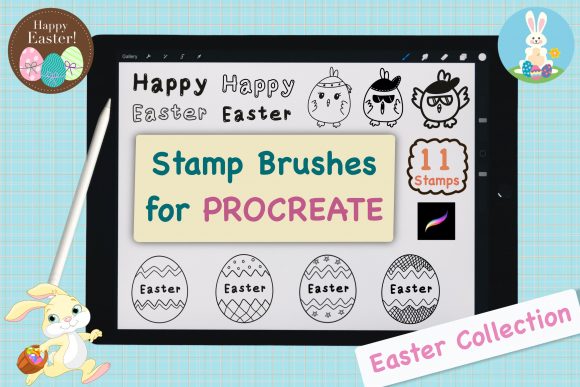
The Procreate Stamp Brushes Set - Happy Easter Collection is a curated library of 11 distinct stamp brushes contained within a single ZIP file. Unlike standard painting brushes that simulate media like watercolor or charcoal, stamp brushes function as pre-drawn elements. When tapped or dragged onto the canvas, they deposit a complete, hand-drawn illustration instantly.
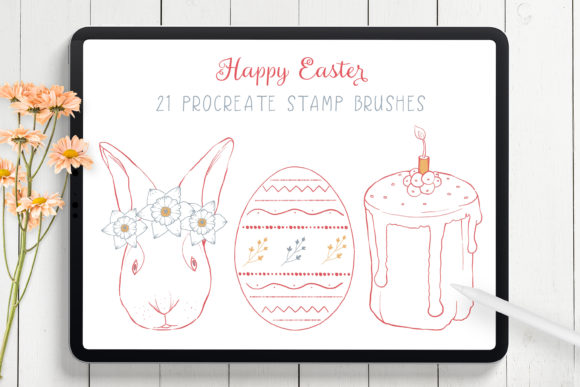
These assets are specifically themed around Easter, featuring motifs commonly associated with the holiday. Because they are hand-drawn, they offer an organic aesthetic that can be difficult to replicate quickly using vector shapes or basic geometric tools. The primary value proposition of this set is time efficiency; rather than illustrating eggs, bunnies, or floral patterns from scratch, the user can place these high-quality elements immediately and focus on composition, coloring, and typography.
Practical Applications and Use Cases
For artists and designers working on seasonal deliverables, this brush set serves as a foundational building block. The versatility of stamp brushes allows them to be integrated into various types of projects where speed and thematic consistency are priorities.
- Greeting Cards and Invitations: This is perhaps the strongest fit for the collection. Users can rapidly assemble layouts for digital or print-ready Easter cards by combining different stamps from the set.
- Social Media Graphics: Content creators needing timely posts for Instagram or Pinterest can use these stamps to create engaging visuals without spending hours on illustration.
- Pattern Design: By repeating and rotating the stamps, users can generate seamless patterns for textiles, wrapping paper, or background textures.
- Scrapbooking and Journaling: Digital planners and scrapbookers can use these elements to decorate pages with minimal effort.
A significant advantage of these brushes is their adaptability. While they come with default colors, Procreate's color dynamics allow users to change the hue, saturation, and brightness of the stamps instantly. Furthermore, because they exist on their own layers upon placement, artists can add text, shadows, or additional hand-painted details to customize the final output. This flexibility ensures that the artwork does not look generic, provided the user takes the time to modify the base assets.
Technical Requirements and Compatibility
Before acquiring or utilizing the Procreate Stamp Brushes - Happy Easter set, it is essential to understand the technical constraints. These brushes are engineered exclusively for the Procreate application on the Apple iPad. They require Procreate version 4 or higher to function correctly.
It is important to note that these files are not compatible with Adobe Photoshop, Clip Studio Paint, or desktop-based illustration software. Additionally, while Procreate can be used with touch input, the full potential of these brushes—particularly regarding pressure sensitivity and precise placement—is best realized when used with an Apple Pencil. Users attempting to import these files into unsupported applications will find the data unreadable, making this a platform-specific investment.
Installation Process
The installation workflow is designed to be straightforward, minimizing technical barriers for users. The process generally follows these steps:
- Download the ZIP file containing the brush set directly to the iPad.
- Navigate to the Files app and locate the downloaded folder.
- Tap the file to unzip it if necessary, revealing the
.brushsetfile. - Open the Procreate app and tap the + icon in the brush library panel, or simply tap the downloaded file while in the Files app to trigger an automatic import.
Once imported, the 11 stamps appear as a new group within the brush library, ready for immediate use. This ease of installation reduces setup time, allowing creators to begin working almost instantly.
Benefits vs. Considerations
When evaluating whether to incorporate this set into a workflow, one must weigh the benefits against potential limitations.
Benefits:
The primary benefit is velocity. For professionals working under tight deadlines, the ability to generate high-quality thematic elements in seconds is invaluable. The hand-drawn nature of the stamps adds a level of artistic charm that elevates the work above standard clip art. Furthermore, the small file size (11 brushes) ensures that the brush library remains uncluttered and performance remains optimal on the iPad.
Considerations and Tradeoffs:
The specificity of the theme is both a strength and a limitation. While perfect for Easter projects, the utility of these brushes diminishes significantly once the season passes. Unlike a universal texture pack or a basic inking brush, these assets have a short shelf life unless the artist works exclusively on holiday-themed content year-round. Additionally, because they are stamps, they offer less control over the internal structure of the drawing compared to creating the element from scratch. Artists who prioritize total control over every stroke may find stamp brushes restrictive.
Decision-Making Insights: Is This Set Right for You?
Determining whether the Procreate Stamp Brushes - Happy Easter collection is a worthwhile addition depends largely on your current project pipeline and skill level.
This set is a strong fit if:
- You are a freelance designer tasked with creating multiple Easter-themed deliverables (cards, flyers, social posts) in a short timeframe.
- You are a beginner in Procreate looking to create professional-looking holiday art without advanced illustration skills.
- You need reliable, cohesive elements to build composite images or patterns quickly.
However, alternatives may be worth considering if:
- You require assets for non-seasonal, evergreen projects.
- you work primarily in Photoshop or on a desktop environment.
- Your goal is to practice and improve fundamental drawing skills, as relying too heavily on stamps can hinder the development of manual illustration techniques.
In conclusion, the Happy Easter Collection is a specialized tool designed to solve a specific problem: the need for fast, high-quality seasonal graphics on the iPad. For users who match the target profile, it offers an efficient path to creative results. For those outside this niche, the limited thematic scope suggests that a more versatile brush library might be a better long-term investment.