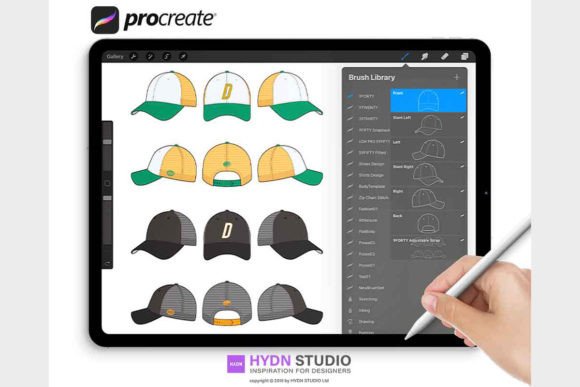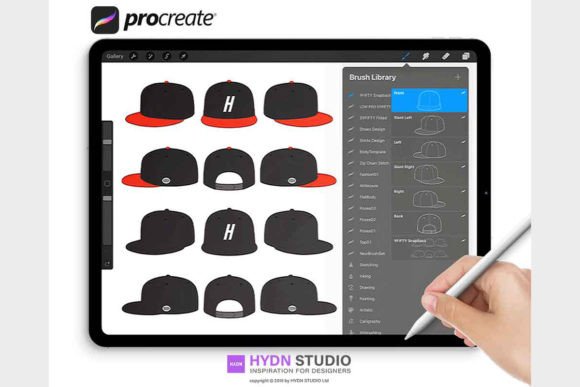
Mastering Headwear Illustration with SNAPBACK Cap Design Stamp Brushes
For fashion illustrators, streetwear designers, and digital artists, capturing the specific essence of urban headwear can be a surprisingly technical challenge. The snapback cap, with its structured crown, flat brim, and distinct panel stitching, requires precision that standard drawing tools often struggle to provide efficiently. This is where specialized digital assets become indispensable. The SNAPBACK Cap Design Stamp Brushes collection represents a targeted solution for creatives looking to streamline their workflow while maintaining high-fidelity detail in their Procreate illustrations. Whether you are mocking up a new brand logo, creating lookbooks, or simply sketching concepts for a 9FIFTY style cap, having the right tools transforms a tedious process into an intuitive creative session.
The Challenge of Digital Fashion Illustration
Designing headwear digitally often involves repetitive tasks that can drain creative energy. Artists frequently find themselves redrawings the same structural lines—the six-panel construction, the ventilation eyelets, the adjustable plastic strap at the back, and the specific curvature of the brim—over and over again. When working on multiple variations or colorways, this repetition not only consumes time but can lead to inconsistencies in perspective and proportion. Furthermore, achieving the crisp, clean lines required for professional fashion flats or vibrant streetwear graphics demands a steady hand and optimized brush settings that react predictably to pressure and tilt.
Many general-purpose brush sets lack the specific geometry needed for accurate cap design. Using a standard round brush to simulate stitching often results in uneven dashes, while trying to freehand the complex curve of a brim can lead to distorted perspectives. These friction points hinder the ability to iterate quickly, which is crucial in the fast-paced world of fashion design. The goal for most professionals is to reduce the time spent on structural drafting so they can focus more on texture, color theory, and branding placement.
How Specialized Stamp Brushes Transform the Workflow
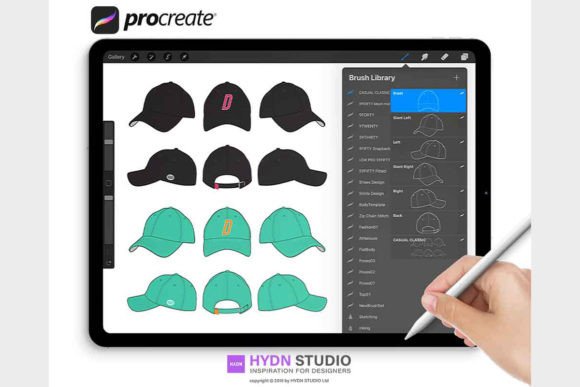
The SNAPBACK Cap Design 03 Procreate Stamp Brushes and the broader 9FIFTY SNAPBACK Cap Design Procreate Stamp Brushes collection address these pain points directly by providing pre-engineered stamps that replicate the physical reality of the garment. These are not just simple images; they are highly optimized Procreate stamp brushes designed to integrate seamlessly into your existing library. By utilizing these tools, artists can place complex structural elements with a single tap, ensuring that every line is clear, easy to manipulate, and geometrically accurate.
The primary advantage lies in consistency and speed. When you need to illustrate a cap from various angles—front, side, three-quarter view, or back—these brushes provide a reliable foundation. You are no longer fighting with the software to get a straight stitch line or a perfectly curved brim. Instead, you lay down the structure instantly and move on to the creative aspects that define your unique style, such as fabric texture, shadow rendering, and graphic application. This shift allows for rapid prototyping of designs, enabling you to present clients or teams with multiple concepts in the time it used to take to draw one.
Practical Applications for Designers and Illustrators
The utility of these Procreate Stamps extends across various stages of the design process. For streetwear brand owners, these brushes are invaluable for creating mockups before committing to physical sampling. You can visualize how a logo sits on the front panel, how contrasting stitching looks against a wool blend, or how a specific colorway plays out on the flat brim. This capability reduces waste and cost by allowing for thorough digital vetting of ideas.
Fashion illustrators also benefit significantly when creating editorial content or technical flats. The high quality of the Procreate Brush files ensures that lines remain sharp even when scaled, making them suitable for both social media graphics and print-ready documents. Because the brushes are optimized for clarity, they work exceptionally well for detailed close-ups that highlight material quality, such as the texture of corduroy or the sheen of satin.
Furthermore, these tools cater to different levels of expertise. A beginner might use the stamps as a learning aid to understand the anatomy of a snapback, tracing over the guides to learn proper proportions. An advanced user, however, might use the stamps as a underlayer, building complex textures and lighting effects on top to create hyper-realistic renderings. The flexibility of the set means it adapts to your specific workflow rather than forcing you to adapt to it.
Installation and Setup for Immediate Use
Getting started with these tools is straightforward, ensuring you can begin creating without technical headaches. The download includes a digital file package containing the Brushset Procreate file with 7 specialized Procreate Stamp Brushes, along with a PDF document detailing installation instructions. To begin, you must first decompress the downloaded zip file. Once extracted, transfer the file ending in .brushset to a cloud folder compatible with your iPad, such as Google Drive, One Drive, Dropbox, or iCloud.
There are three efficient methods to install these brushes depending on your setup:
- Add Brush Set on Mac: If you are using a Mac with MacOS 10.11 or later, the simplest method is to AirDrop the brush set directly from your computer to your iPad. This seamless transfer ensures that all sets of brushes are sent and installed at once, automatically opening in Procreate upon receipt.
- Add Brush Set from iPad: For those working directly on the tablet, open your preferred cloud storage app (Google Drive, One Drive, Dropbox, or iCloud) and navigate to the folder where you saved the brush set. Select the
.brushsetfile, click the small "..." or share icon, and select "Export." Then, choose "Open in Procreate." The moment Procreate launches, a new set of brushes will appear at the very top of your brush library, ready for use. - Add from Procreate: Alternatively, within the Procreate app itself, you can navigate to the Brush Library, swipe left on any category to create a new one if desired, and tap "Import" at the top. Navigate to your cloud location via the Files app integration within Procreate to select and import the set directly.
Making the Most of Your Digital Toolkit
Once installed, the key to maximizing the value of the SNAPBACK Cap Design Stamp Brushes is experimentation. Do not limit yourself to using the stamps exactly as they appear. Because they are native Procreate brushes, you can adjust their size, opacity, and blending modes. Try overlaying different stamp elements to create hybrid styles or use them as masks for intricate pattern fills. Remember that these tools are meant to serve your vision; they provide the structural backbone, but your artistic choices bring the design to life.
In the competitive landscape of fashion design, efficiency and precision are paramount. By integrating these specialized Procreate Stamp Brushes into your routine, you eliminate the guesswork of structural drawing and empower yourself to focus on innovation. Whether you are refining a single concept or generating a full seasonal collection, these high-quality resources provide the reliability and clarity needed to elevate your digital fashion illustration to a professional standard.