Unlocking Digital Luster: A Comprehensive Guide to Magic Pearl Procreate Brushes Palettes
The landscape of digital illustration has evolved rapidly, moving from flat vector aesthetics to rich, textured environments that mimic traditional media with uncanny precision. Among the most sought-after effects in contemporary design is the iridescent quality of mother-of-pearl, a visual texture that conveys luxury, depth, and organic beauty. For artists working within the iPad ecosystem, the Magic Pearl Procreate Brushes Palettes represent a specialized toolkit designed to replicate this complex optical phenomenon without the steep learning curve of manual texturing. This collection is not merely a set of stamps; it is a sophisticated system for integrating holographic realism into digital workflows, catering to everyone from professional graphic designers to hobbyist crafters.
The Mechanics of Digital Iridescence
Understanding the value of this brush pack requires a look at how digital pearls are constructed. In traditional painting, achieving a pearlescent effect involves layering translucent glazes over dark underpaintings, allowing light to refract through multiple layers of pigment. Replicating this digitally usually demands complex blend modes and custom layer styles. The Magic Pearl Procreate Brushes Palettes streamline this process by embedding these optical properties directly into the brush engine. The pack includes 15 distinct brushes, each engineered to interact with the canvas in specific ways that simulate the physical behavior of light on nacreous surfaces.
Central to this collection is the Pearl Creator Pen. Unlike standard round brushes that lay down flat color, this tool is designed for kinetic application. By moving the stylus in small, circular motions, the artist can build up shimmering spheres that appear three-dimensional. This technique mimics the way light catches the curvature of a real pearl, creating highlights and shadows dynamically as the stroke is applied. It transforms a simple dot into a gem-like object, adding immediate focal points to lettering or illustrative elements.
Complementing the pearl generator is a dedicated shell texture brush. This tool is essential for creating backgrounds or large surface areas that imitate the inside of mother-of-pearl shells. Rather than applying a static image overlay, this brush allows for organic variation, ensuring that no two strokes look identical. This variability is crucial for maintaining a hand-crafted feel in digital projects, preventing the repetitive patterns that often betray digital origins.
Strategic Applications Across Industries
The versatility of these digital assets extends far beyond fine art illustration. Because the output is high-resolution and adaptable, the Magic Pearl Procreate Brushes Palettes serve as a foundational resource for various commercial and personal projects. The ability to toggle between subtle sheens and bold holographic statements makes them suitable for a wide array of deliverables.
Ephemeral Design and Stationery
In the realm of greeting cards, invitations, and scrapbooking, texture adds a tactile dimension to visual communication. Designers can use the lettering brushes within the pack to create wedding invitations that shimmer with a pearlescent glow, evoking the elegance of fine paper stock. For scrapbookers, the shell texture brush provides unique backgrounds that frame photographs with an organic, oceanic feel. When these designs are prepared for print, the contrast between the dark, deep tones of the pearl effect and the bright highlights ensures that the printed goods retain their visual impact, even when translated from screen to paper.
Print on Demand and Wall Art
The rise of print-on-demand services has created a massive market for niche aesthetic designs. Artists utilizing these brushes can create wall art collections centered around marine themes, abstract luxury, or celestial motifs. The holographic nature of the brushes is particularly effective on dark backgrounds, where the iridescence pops with maximum intensity. However, the pack is versatile enough to work on lighter canvases as well, offering a softer, more ethereal glow. This adaptability allows creators to produce cohesive collections for home decor, phone cases, and apparel that stand out in crowded marketplaces.
Digital Crafting and Asset Creation
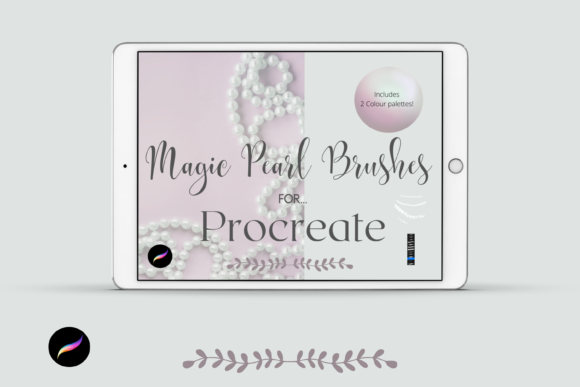
For those focused purely on digital products, such as sticker packs for planning apps or clip art elements for other designers, this toolset offers efficiency. The pre-configured textures mean that a creator can generate hundreds of unique pearl elements in a fraction of the time it would take to paint them manually. These elements can be exported as transparent PNGs and sold as standalone assets or incorporated into larger design suites. The inclusion of two distinct color palettes further expands the creative possibilities, allowing users to shift between cool, oceanic blues and warm, rosy pinks depending on the project's mood.
Technical Requirements and Workflow Integration
To leverage the full potential of the Magic Pearl Procreate Brushes Palettes, users must operate within a specific hardware and software environment. These files are native to the Procreate application, meaning they will not function in Photoshop, Illustrator, or other raster graphics programs. Consequently, access to an iPad Pro (or a compatible iPad model supporting the latest version of Procreate) and an Apple Pencil is mandatory. The pressure sensitivity and tilt recognition of the Apple Pencil are critical for the brushes to respond correctly, allowing for the nuanced control needed to create realistic pearl variations.
The installation process, while straightforward, requires a few preparatory steps that new users should anticipate. Since the brush pack is delivered as a compressed digital file, users cannot import it directly from an email attachment or a web browser download folder into Procreate. Instead, a file management workflow is necessary:
- Download Phase: The user must first download the zip file containing the brushes and palettes to a cloud storage service like iCloud Drive or a local file manager app.
- Decompression: Using a utility app such as iZip or the built-in Files app on iOS, the user must unzip the archive. This step extracts the individual
.brushand.swatchesfiles. - Importation: Once extracted, tapping on the files will trigger the "Open in Procreate" command. The brushes will automatically install into a newly created folder within the Procreate brush library, keeping the workspace organized.
This requirement for external file management ensures that the integrity of the brush settings is maintained during transfer. It also allows users to back up their digital tools easily, preserving their investment in case of device failure.
Aesthetic Considerations and Best Practices
While the Magic Pearl Procreate Brushes Palettes are powerful, achieving professional results requires an understanding of lighting and composition. As noted in the product documentation, some brushes achieve their peak visual fidelity against dark backgrounds. This is due to the physics of light simulation; the bright, specular highlights of the pearl effect require a contrasting base to be perceived by the eye. When working on white or light-colored canvases, artists may need to adjust the opacity of the brush or layer a subtle drop shadow beneath the pearlescent elements to ensure they do not get lost in the background.
Furthermore, the two included color palettes are not just decorative additions but functional tools for color harmony. The "Holographic Mother of Pearl" palette is curated to ensure that every color selected works cohesively with the texture of the brushes. Deviating from these palettes is possible, but beginners are encouraged to start within these constraints to understand how the brush engine interacts with specific hue and saturation values. Over time, experienced users can modify these swatches or create new ones, but the preset palettes provide a reliable starting point for consistent results.
The Value of Specialized Digital Toolsets
In an era where generic brush sets are ubiquitous, specialized packs like this offer significant value by solving specific artistic problems. The time saved by not having to manually construct pearl textures from scratch allows creators to focus on composition and storytelling. For educators teaching digital art, these brushes serve as excellent examples of how technology can emulate traditional materials, bridging the gap for students transitioning from physical media to digital tablets.
Moreover, the commercial viability of the resulting artwork cannot be overstated. The demand for "luxury" aesthetics in branding and packaging is perennial. By mastering the Magic Pearl Procreate Brushes Palettes, freelancers and business owners can offer a premium tier of service, delivering assets that convey high value and sophistication. Whether used for a limited-edition product label or a sprawling digital mural, the capacity to render convincing luster adds a layer of polish that elevates the overall quality of the work.
Ultimately, the effectiveness of these tools lies in their balance of automation and control. They handle the complex mathematics of light refraction and texture generation, leaving the artist free to direct the creative vision. For anyone looking to expand their digital repertoire with effects that captivate and engage, this collection provides a robust, reliable, and creatively stimulating foundation.