Easter Egg Brushes DIY: A Digital Stamp Set for Procreate
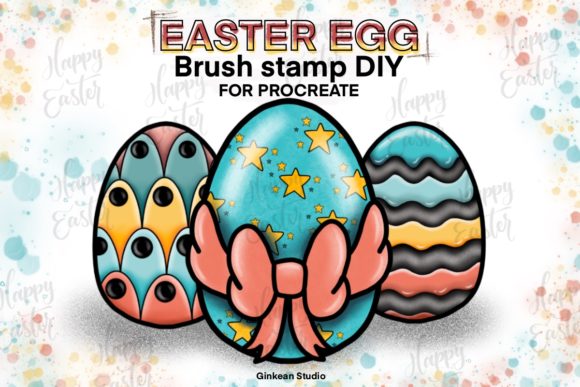
Spring brings a specific kind of creative energy, one that leans into pastels, renewal, and playful patterns. For digital artists, planners, and content creators working within the iPad ecosystem, capturing this seasonal vibe often comes down to having the right tools at your fingertips. The Easter Egg Brushes DIY collection offers exactly that—a streamlined, versatile set of digital stamps designed specifically for the Procreate app. Unlike traditional brushes that require stroke dynamics and pressure sensitivity to create texture, this set functions as a library of pre-designed elements. It allows you to build complex, festive compositions with a single tap, making it an ideal solution for those who need to produce high-quality seasonal content without spending hours hand-drawing every detail.
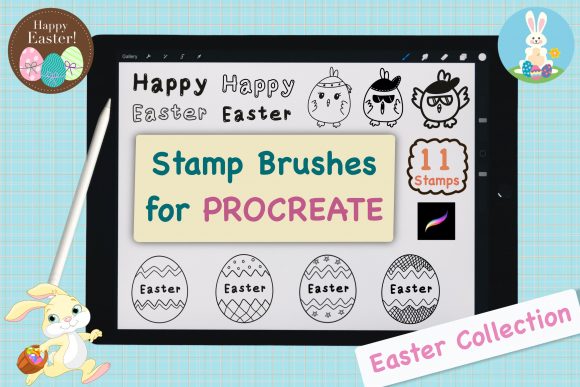
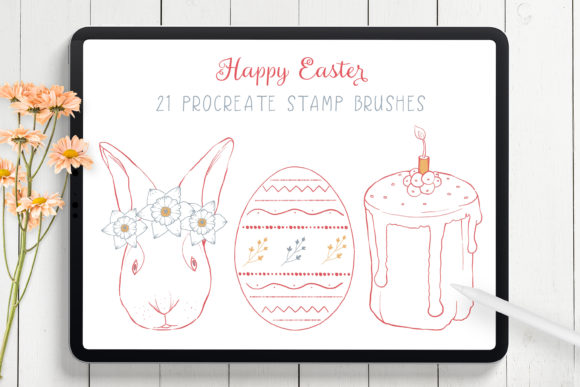
This isn't just a collection of clipart; it is a functional design asset built for flexibility. The set includes 23 distinct Easter egg elements housed in a single .brushset file. What makes this approach particularly powerful for designers and small business owners is the "mix and match" capability. Each element acts as a modular component. You aren't stuck with a static image; instead, you can layer different patterns, colors, and shapes to generate unique egg designs that fit your specific brand identity or project theme. Whether you are designing a digital planner spread, creating social media graphics for a spring sale, or illustrating a children's ebook, these brushes provide a foundational structure that you can customize endlessly.
Streamlining Seasonal Design Workflows
In the world of digital planning and journaling, time is often the most scarce resource. Users of digital planners on iPads are constantly looking for ways to decorate their pages without cluttering their canvas or slowing down their workflow. The Easter Egg Stamp Brush set for Procreate addresses this by eliminating the need for external image imports. Because the elements are native brushes, they integrate seamlessly into your existing workflow. You simply select the brush, choose your foreground color, and tap the screen. The result is a crisp, vector-like stamp that scales perfectly without losing resolution.
The visual personality of these brushes strikes a balance between whimsical and clean. They avoid the overly intricate details that can muddy a design when scaled down, focusing instead on bold patterns and clear shapes. This makes them highly effective for editorial design within digital magazines or newsletters where clarity is paramount. For marketers preparing spring campaigns, these assets allow for rapid iteration. You can test five different color palettes in the time it would take to sketch one egg manually. This efficiency is crucial for entrepreneurs and bloggers who need to maintain a consistent posting schedule during busy holiday seasons.
Furthermore, the utility of this set extends beyond simple decoration. Because the brushes are pressure-sensitive compatible (though they function primarily as stamps), they offer a degree of organic placement that feels more natural than copying and pasting PNG files. When building a brand identity for a seasonal product launch, consistency is key. Using a unified set of elements ensures that your Instagram stories, email headers, and digital ads all share a cohesive visual language. This level of consistency helps reinforce brand recognition, signaling to your audience that your content is professional and thoughtfully curated.
Technical Compatibility and Installation Essentials
Before diving into creation, it is vital to understand the technical requirements to ensure a smooth experience. This Easter egg DIY INSTANT DOWNLOAD is engineered exclusively for the Procreate app on iPad. It is important to note that these brushes do not function in Photoshop, Illustrator, or any other desktop-based design software. They rely on Procreate's specific brush engine to render the stamps correctly. Additionally, while the brushes are easy to use, optimal performance requires an iPad Pro or a compatible iPad model paired with an Apple Pencil or a pressure-sensitive stylus. This hardware combination ensures that you have the precision needed to place elements exactly where you want them within your composition.
Installation is straightforward, but there is a specific nuance regarding iOS file management that often trips up new users. You cannot download or install the brush set directly from the Etsy mobile app. To get your .brushset file into Procreate, you must use the Safari browser on your iPad. Once you have purchased and downloaded the zip file from Etsy, locate the download arrow in the top right corner of the Safari browser bar. Tap this to view your downloads, then select the .brushset file. Procreate will automatically launch and import the brushes into your library. This seamless integration means you can go from purchase to creation in under a minute, provided you follow the correct download path.
Once installed, the usability is intuitive. There is no complex configuration required. You navigate to your brush library, find the new set, and begin tapping. The "mix and match" feature mentioned earlier relies on your ability to layer these stamps. By changing the opacity of individual layers or using the blending modes available in Procreate, you can create depth and texture that mimics traditional media. This flexibility makes the set suitable for a wide range of applications, from packaging design mockups for spring products to custom logo design elements for seasonal promotions.
Maximizing Value Across Creative Projects
The true value of the Easter Egg Brushes DIY set lies in its adaptability across different mediums. For publishers and authors creating children's books, these brushes can serve as the basis for character props or background details. The clean lines ensure that the artwork remains legible even when printed at smaller sizes. For web designers, these elements can be exported as PNGs and used to add festive touches to landing pages without increasing load times significantly, as the original vector-like quality allows for optimization.
When considering font pairing and typography alongside these graphical elements, the playful nature of the eggs suggests a few directions. A clean sans serif font works well to maintain modernity and readability, letting the decorative eggs take center stage. Alternatively, a casual handwritten font or script font can enhance the DIY, crafty aesthetic, creating a warm and inviting atmosphere for personal blogs or greeting cards. If your project demands a more sophisticated look, such as high-end packaging design for artisanal chocolates, pairing these patterns with a refined serif font can elevate the perceived value of the product.
Commercial licensing is another critical factor for professionals. As a design asset intended for creators, this set empowers small business owners to produce their own marketing materials without hiring a dedicated illustrator for every seasonal update. However, always review the specific license terms included with your download to ensure compliance for commercial use. Generally, assets like these are designed to help you create end-products for sale, such as printed planners or digital invitations, rather than reselling the brushes themselves.
In summary, the Easter Egg Stamp Brush set for Procreate is more than just a holiday novelty; it is a practical tool for efficient digital creation. It bridges the gap between amateur crafting and professional design by providing high-quality, customizable elements that save time and enhance visual appeal. Whether you are a hobbyist looking to spruce up your digital journal or a marketer launching a spring campaign, this set provides the foundational elements needed to create engaging, professional-grade visuals with ease.