Evaluating the Cheerful Little Bunny Procreate Brushes for Spring Design Projects
As digital artists and designers prepare for seasonal transitions, selecting the right tools becomes a critical part of the creative workflow. The Procreate Brushes "Cheerful Little Bunny" set represents a specialized collection designed specifically to capture the essence of Easter and the arrival of spring. This article provides an objective evaluation of this digital asset, helping you determine if it aligns with your specific design goals, software environment, and project requirements.
Understanding the Product Scope
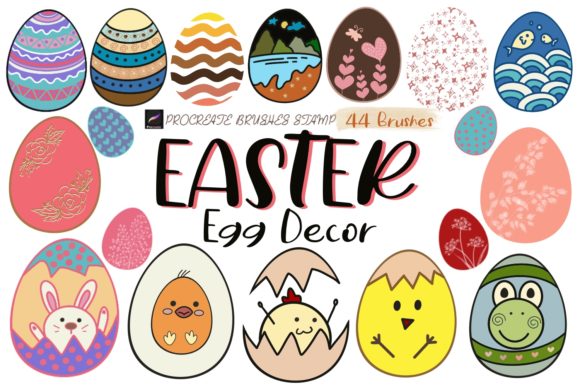
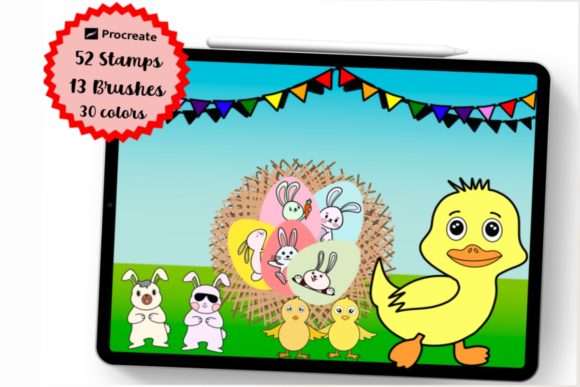
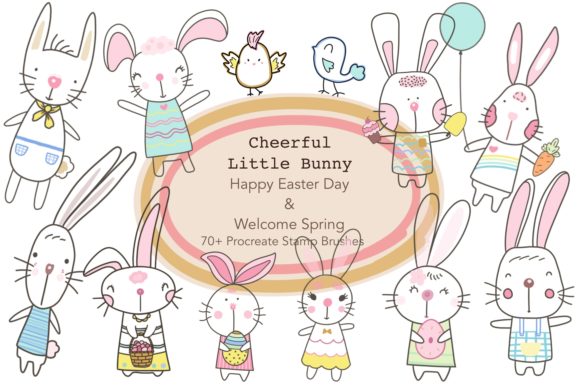
The "Cheerful Little Bunny" collection is a digital stamp set created exclusively for the Procreate application on iPad. It consists of 60 individual stamps contained within a single .brushset or .zip file, depending on the delivery method. Unlike standard painting brushes that simulate media like watercolor or charcoal, these are stamp brushes. This means each tap on the canvas places a pre-designed illustration, such as bunnies, eggs, flowers, or festive typography, rather than creating a continuous stroke.
It is crucial to understand the technical limitations immediately: this is a digital product with no physical component. Furthermore, these brushes are engineered strictly for the Procreate ecosystem. They will not function in Adobe Photoshop, Clip Studio Paint, Affinity Designer, or any other desktop or mobile illustration software. If your primary workflow relies on desktop applications, this tool will not be compatible with your current setup.
Ideal Use Cases and Applications
For designers looking to streamline their workflow during the spring season, this brush set offers significant utility in specific scenarios. The primary value proposition lies in speed and consistency. Creating intricate patterns or populating a scene with detailed characters from scratch can be time-consuming. With 60 varied stamps, users can rapidly assemble complex compositions.
The set is particularly well-suited for the following applications:
- Social Media Graphics: Content creators needing quick, engaging visuals for Instagram stories or posts celebrating Easter can utilize these stamps to create festive overlays without needing advanced drawing skills.
- Surface Pattern Design: The repetitive nature of stamp brushes makes them ideal for generating seamless patterns for textiles, wrapping paper, or digital backgrounds.
- Greeting Cards and Stationery: The "feel good" and "lovely" aesthetic described in the product theme aligns perfectly with greeting cards, invitations, and printable stationery.
- Merchandise Mockups: Designers creating mockups for T-shirts, tote bags, scarves, and mugs can use these elements to visualize final products quickly.
- Coloring Books: Since these are line-based or filled stamps, they can serve as base illustrations for digital coloring books or printable activity sheets for children.
Benefits of Using Specialized Stamp Brushes
The decision to invest in a themed brush set like "Cheerful Little Bunny" often comes down to efficiency versus customization. The most significant benefit is the reduction of production time. For freelancers working on tight deadlines for seasonal clients, having a library of pre-drawn, cohesive elements allows for rapid prototyping and finalization of designs.
Additionally, using a unified set ensures visual consistency. When all 60 stamps share the same line weight, style, and color palette potential, the resulting artwork feels cohesive. This is often harder to achieve when sourcing individual clip art from various free repositories, which may differ in resolution and artistic style.
For those who enjoy the "Welcome Spring" and "Happiness moment" themes, these brushes provide an immediate emotional resonance. The imagery is tailored to evoke joy and celebration, which is essential for marketing materials related to holidays and seasonal sales.
Tradeoffs and Considerations
While the convenience is high, there are tradeoffs to consider before purchasing. The primary limitation is the lack of editability inherent to stamp brushes. While you can change the color of a stamp in Procreate using adjustment layers or alpha lock, you cannot easily alter the fundamental shape or pose of the bunny or egg once stamped without redrawing parts of it manually. If your project requires highly customized character poses or unique variations not included in the 60-stamp set, you may find the tool restrictive.
Another consideration is the platform dependency. As noted, these brushes are useless outside of the iPad Procreate environment. If you collaborate with a team that works primarily in vector-based software like Adobe Illustrator for scalability, integrating raster-based Procreate stamps can complicate the hand-off process. Raster images have resolution limits, whereas vectors can be scaled infinitely without quality loss. For large-format wall art or billboard-sized prints, you must ensure the canvas resolution in Procreate is set high enough initially to prevent pixelation.
Comparing Alternatives
When evaluating whether "Cheerful Little Bunny" is the right choice, it is helpful to compare it against alternative methods of acquiring similar assets.
Vector Libraries: If your end goal is scalable merchandise like T-shirts or large wall art, a vector library (SVG or EPS format) might be a superior alternative. Vectors allow for infinite scaling and easier color separation for screen printing. However, vectors often require more manual assembly and lack the hand-drawn texture that Procreate brushes naturally provide.
Hand-Drawn Illustrations: Creating your own assets from scratch offers total creative control and uniqueness. This approach is best for high-end branding where distinctiveness is paramount. However, this requires significant time investment and advanced illustration skills, which may not be feasible for quick-turnaround social media content.
Generic Clip Art: Free or low-cost generic clip art is widely available. While cost-effective, these assets often suffer from overuse, meaning your designs may look similar to thousands of others. A dedicated Procreate brush set like this offers a more curated and stylistically consistent alternative.
Making the Decision
To determine if the Procreate Brushes "Cheerful Little Bunny" set is a strong fit for your needs, ask yourself the following questions:
- Do I work primarily in Procreate on an iPad? If the answer is no, this product is not viable for you.
- Is my project deadline tight? If you need to produce Easter-themed content quickly, the efficiency of stamp brushes is a major advantage.
- Do I need a cohesive style? If you want all your elements to match perfectly without spending hours harmonizing different clip art sources, this set provides that unity.
- Am I creating for print or digital? Ensure you understand the resolution requirements for your specific output. For digital use and standard print sizes, these brushes are excellent. For massive scale printing, verify your canvas settings.
In conclusion, the "Cheerful Little Bunny" brush set is a specialized tool designed to enhance productivity for iPad-based designers focusing on spring and Easter themes. It excels in situations requiring rapid deployment of cute, consistent imagery for social media, pattern design, and light merchandise. However, users requiring vector scalability, cross-platform compatibility, or deep character customization should weigh these limitations against the convenience offered. By understanding both the capabilities and the constraints of this digital product, you can make an informed decision that best supports your creative objectives.