Evaluating Tropical Leaves Brushes for AI in Digital Design Workflows
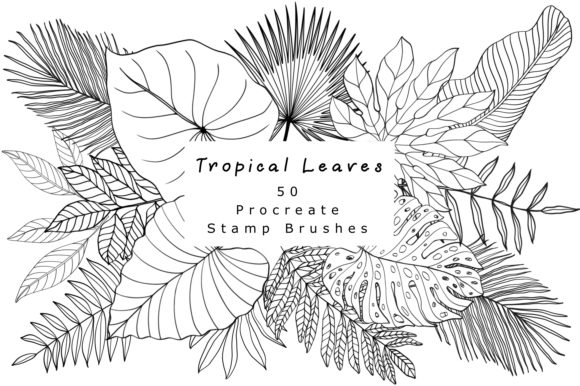
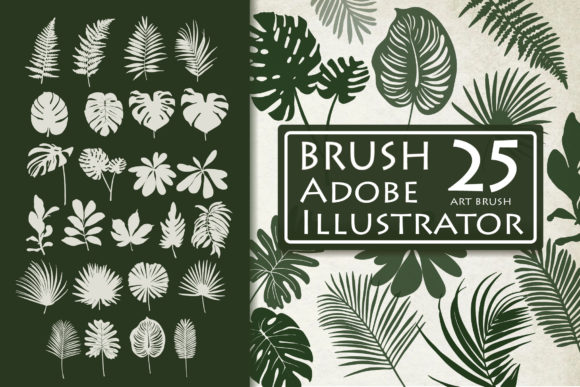
For graphic designers and illustrators seeking to incorporate organic, botanical elements into their work, Tropical Leaves Brushes for AI offer a specialized set of tools designed specifically for Adobe Illustrator. This collection consists of 25 flexible, adjustable art brushes that allow users to create vector-based foliage with varying degrees of complexity and style. Unlike raster-based stamp brushes found in pixel-editing software, these tools function as path-based modifiers, enabling the creation of scalable designs suitable for a wide range of applications, from small business cards to large-format posters.
The primary appeal of this collection lies in its adaptability. Each brush is engineered to respond to the path drawn by the user, meaning the resulting leaf pattern adjusts dynamically to the length and curvature of the stroke. This functionality is crucial for professionals who require consistency across different media sizes. Whether the goal is to design an invitation suite, decorate a pillow cover, or develop a brand identity logo, the vector nature of these brushes ensures that the output remains crisp and editable regardless of scaling.
Understanding the Technical Capabilities
At the core of Tropical Leaves Brushes for AI is the Adobe Illustrator art brush technology. When a user selects one of the 25 included brushes and draws a path, the software maps the leaf artwork along that trajectory. A significant advantage of this system is the ability to modify the result post-application. Users can alter the size, shape, and color of the generated foliage without losing resolution or detail. This level of control is essential for refining compositions where specific leaf arrangements are necessary to fit a layout or follow a textual contour.
The collection is delivered primarily in formats compatible with Adobe Illustrator CC, including a dedicated file containing 10 of the brushes, with the full set available within the package. Additionally, an EPS file is included to ensure compatibility with other vector-based programs, although the full interactive flexibility is best realized within the Illustrator environment. It is important to note a critical technical distinction: these are vector art brushes, not raster textures. Consequently, they are not designed for use in Adobe Photoshop or other pixel-based editors, which limits their utility for users whose workflows rely exclusively on bitmap manipulation.
Practical Applications and Use Cases
The versatility of these brushes makes them a strong fit for several specific design scenarios. For print designers working on invitations, business cards, and packaging, the ability to quickly generate decorative borders or background patterns saves considerable time compared to drawing individual leaves manually. The scalable nature of the vectors ensures that fine details remain sharp even when printed on high-resolution substrates.
In the realm of product design and merchandise, such as T-shirts, pillows, and covers, these brushes allow for the creation of seamless patterns or isolated design elements that can be easily recolored to match specific brand palettes. Social media managers and digital marketers may also find value in using these tools to create unique post graphics or story highlights that stand out from generic stock imagery. Furthermore, because the brushes are editable, they serve as excellent starting points for logo design, where a stylized leaf motif might need to be simplified or exaggerated to meet branding guidelines.
Benefits and Efficiency Gains
Adopting Tropical Leaves Brushes for AI offers distinct efficiency benefits. The most notable is the reduction in production time. Creating realistic or stylized tropical foliage from scratch requires significant skill in anchor point manipulation and shading. These brushes automate the repetition and distribution of leaf shapes, allowing the designer to focus on composition and color theory rather than tedious drawing tasks.
Another benefit is the consistency of style. Since all 25 brushes belong to the same collection, they share a cohesive aesthetic. This ensures that when multiple elements are used in a single project—such as a large monstera leaf in the background and smaller palm fronds in the foreground—the overall visual language remains unified. The ability to instantly edit, reshape, and resize paths also facilitates rapid iteration during the client review process, enabling designers to present multiple variations of a concept quickly.
Considerations and Limitations
While the collection offers substantial utility, there are tradeoffs and limitations that potential users must evaluate. The most significant constraint is software dependency. As noted, these brushes are optimized for Adobe Illustrator. Users who prefer Affinity Designer, CorelDRAW, or open-source alternatives like Inkscape may find the EPS files useful for importing static shapes, but they will likely lose the dynamic "brush" functionality that allows for path-based adjustment. Therefore, this tool is not suitable for non-Illustrator workflows.
Additionally, while the brushes are flexible, they do have boundaries regarding customization. The underlying artwork of the leaf is fixed; users can stretch, compress, and recolor it, but they cannot fundamentally change the texture or vein structure of the leaf without expanding the appearance and editing the vector points manually. For projects requiring hyper-realistic botanical accuracy or specific species not represented in the set, these stylized brushes may serve better as decorative accents rather than scientific illustrations.
There is also a learning curve associated with mastering art brushes in Illustrator. Users unfamiliar with adjusting brush scale options, overlap settings, and pressure sensitivity (if using a tablet) may initially find the results unpredictable. Achieving the "perfect number of songs" or rhythm in the design—as metaphorically described in creative workflows—requires practice in controlling stroke weight and path direction.
Decision-Making Insights for Buyers
When determining whether Tropical Leaves Brushes for AI align with your project goals, consider the following factors:
- Software Environment: If your primary design tool is Adobe Illustrator, this collection integrates seamlessly. If you work primarily in Photoshop or other raster programs, this product will not meet your needs.
- Project Scale: For projects requiring scalability, such as large format prints or variable-sized merchandise, the vector format is a superior choice over raster clips.
- Style Requirements: Evaluate if the specific tropical aesthetic of the 25 included brushes matches your brand or project tone. While editable, the base style is distinct.
- Workflow Speed: If you frequently need to incorporate botanical elements and currently draw them manually, this toolset offers a clear return on investment through time savings.
In conclusion, Tropical Leaves Brushes for AI represent a practical resource for vector-based designers looking to enhance their toolbox with efficient, scalable botanical elements. They excel in environments where flexibility, editability, and resolution independence are paramount. However, their value is contingent upon the user's proficiency with Adobe Illustrator and the specific stylistic demands of the project. By understanding both the capabilities and the software-specific constraints, designers can make an informed decision on whether this collection will effectively support their creative objectives.