Integrating 20 Handmade Grunge Art Brushes into Professional Design Workflows
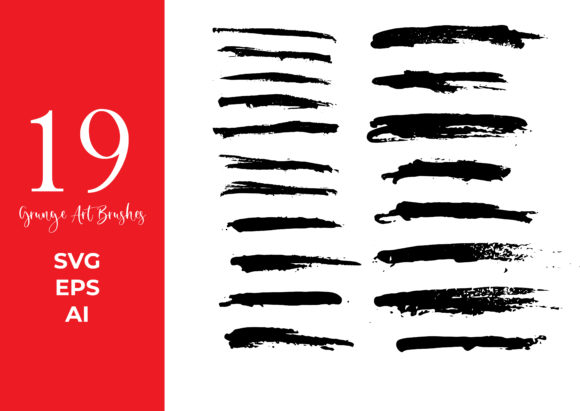
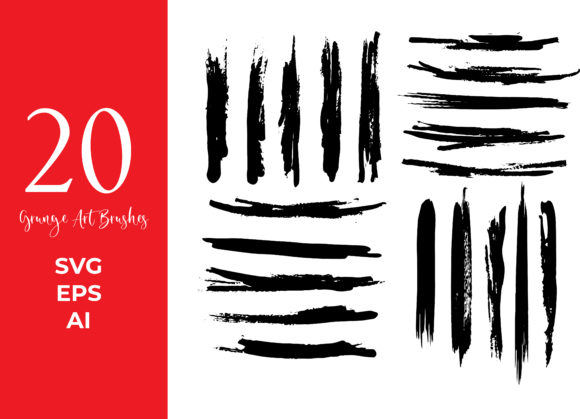
In the landscape of modern digital design, the pursuit of authenticity often leads creators away from sterile, perfect vectors and toward textures that feel human, worn, and organic. The 20 Handmade Grunge Art Brushes collection represents a strategic asset for designers seeking to inject this specific aesthetic into their projects without sacrificing the scalability and editability of vector graphics. These are not merely decorative elements; they are functional tools designed to streamline the texturing process within Adobe Illustrator, bridging the gap between rough, inky hand-drawn sensations and precise digital execution.
For professionals ranging from freelance illustrators to marketing agency art directors, integrating these brushes requires understanding where they fit within a broader creative pipeline. Whether you are developing a brand identity that needs an edge, creating merchandise designs, or producing editorial illustrations, these messy, inky, and glitchy assets serve as a catalyst for visual interest. The key to maximizing their value lies in treating them as modular components of a larger workflow rather than standalone fixes.
Pre-Production Planning and Asset Organization
Before opening Adobe Illustrator to begin a new project, effective workflow management starts with asset organization. When working with textured resources like the 20 Handmade Grunge Art Brushes, preparation ensures consistency across deliverables. Since this collection includes files in SVG, EPS, and AI formats, compatibility is rarely an issue, but how you load and categorize them matters.
Begin by importing the brush libraries into your specific Illustrator workspace. Unlike raster textures that might require complex masking or blending modes every time they are used, these vector brushes are ready to apply immediately. However, a prudent step is to create a dedicated "Texture" layer in your document structure. This separates your grunge elements from your primary line work and color flats, allowing for non-destructive editing later in the process. By isolating these 20 varied and unique vector brushes on their own layer, you maintain control over opacity, blending modes, and stacking order without risking accidental alterations to your core design elements.
Furthermore, because these brushes are fully editable, consider creating a swatch library of neutral grays or muted tones specifically for testing. While the brushes can change to any color instantly, starting with a neutral palette during the layout phase helps you focus on composition and texture density before committing to a final brand color scheme. This approach prevents visual clutter from distracting you during the initial conceptual stages.
Execution: Applying Texture During the Creative Process
Once the foundation of your design is established, the implementation of the 20 Handmade Grunge Art Brushes transforms flat vectors into dynamic compositions. The strength of this collection lies in its variety; with 20 distinct options ranging from rough ink splatters to glitchy distortions, you can match the texture to the emotional tone of the project.
For example, when designing a poster for a music event or a streetwear brand, you might utilize the messier, inky brushes to create a background wash that suggests movement and energy. Apply these strokes broadly behind your typography to add depth without obscuring legibility. Conversely, for a more subtle application, such as adding wear to a logo mockup, the finer, scratchier brushes in the set can be scaled down and applied sparingly to edges and corners. This mimics natural degradation, giving the digital object a history and a tactile feel.
The ability to edit these brushes is critical during execution. Because they are vector-based, you are not locked into a static shape. If a specific grunge stroke feels too heavy, you can use the Direct Selection Tool to remove anchor points or adjust curves, tailoring the texture to fit tight spaces around letterforms or intricate illustrations. This level of control is often missing in raster-based texture packs, making these exclusive brushes particularly valuable for projects requiring precision alongside chaos.
Moreover, the "glitchy" nature of some brushes in this set offers a unique opportunity for tech-focused or avant-garde designs. By combining these distorted lines with clean, geometric sans-serif typography, you create a compelling visual contrast that captures attention. This technique is highly effective in social media graphics where stopping the scroll is the primary objective.
Post-Production Refinement and Quality Control
After applying the textures, the workflow shifts to refinement. A common pitfall in grunge design is over-texturing, which can reduce readability and make a design look muddy. To avoid this, review your work at both 100% zoom and fit-to-screen views. Use the Transparency panel in Illustrator to experiment with blending modes like "Multiply," "Overlay," or "Soft Light." Often, lowering the opacity of the grunge layer to 30-50% provides enough texture to break up solid colors while maintaining a professional polish.
Since the 20 Handmade Grunge Art Brushes allow for color customization, this is the stage to ensure alignment with your client's brand guidelines. Select the textured paths and apply the exact hex codes required. Because the brushes are vector shapes, the color shift is instant and crisp, ensuring no loss of quality regardless of the output size. This is particularly important for large-format printing, such as billboards or vehicle wraps, where raster textures might pixelate.
Quality control also involves checking the file structure before handing off assets. Ensure that all expanded appearances are intentional. While keeping the brushes live (unexpanded) allows for future edits, some print vendors prefer expanded paths to avoid rendering issues. Given that these files are provided in AI, EPS, and SVG, you have the flexibility to save a master file with live brushes for your archives and an expanded version for production, ensuring long-term usability and consistency.
Integration with Other Tools and Platforms
While these brushes are native to Adobe Illustrator, their utility extends beyond a single application. In a multi-software workflow, you might design the base composition in Illustrator using the 20 Handmade Grunge Art Brushes, then export the textured elements to Photoshop for final compositing with photographic elements. The vector nature of the brushes ensures that when they are rasterized in Photoshop, they retain sharp edges at any resolution you choose.
Additionally, these assets are highly compatible with motion graphics workflows. By importing the AI files into Adobe After Effects, you can animate the grunge strokes. The separate paths of the vector brushes allow for trim path animations, making it possible to have ink splatters appear dynamically or glitch effects flicker on screen. This expands the lifecycle of the asset from static print to digital video, offering greater return on investment for content creators and marketers.
For web designers, the SVG format included in the pack is invaluable. You can implement these grunge elements directly into website backgrounds or UI accents. Because SVGs are code-based and scalable, they load quickly and remain crisp on high-DPI displays, unlike heavy JPEG textures. This makes the 20 Handmade Grunge Art Brushes suitable not just for print, but for responsive web design where performance and clarity are paramount.
Long-Term Value and Workflow Efficiency
Investing in a curated set of exclusive brushes saves significant time compared to creating textures from scratch or searching for free, inconsistent resources online. The reliability of having 20 varied, high-quality options means you spend less time hunting for the right look and more time executing the design. Over time, familiarity with this specific set allows you to develop a signature style, recognizing instantly which brush works best for a given scenario.
Consistency is another long-term benefit. When working on a series of deliverables, such as a social media campaign or a multi-page brochure, using the same set of brushes ensures a cohesive visual language. You can build templates where these grunge elements are pre-positioned or styled, allowing for rapid deployment of new content while maintaining brand integrity.
Ultimately, the 20 Handmade Grunge Art Brushes are more than just a download; they are a workflow enhancer. They provide the messy, human element that digital design often lacks, packaged in a format that respects the need for precision and editability. By integrating them thoughtfully—organizing layers, adjusting blending modes, and leveraging their vector capabilities across different platforms—designers can elevate their output, creating work that feels both professionally polished and authentically raw.